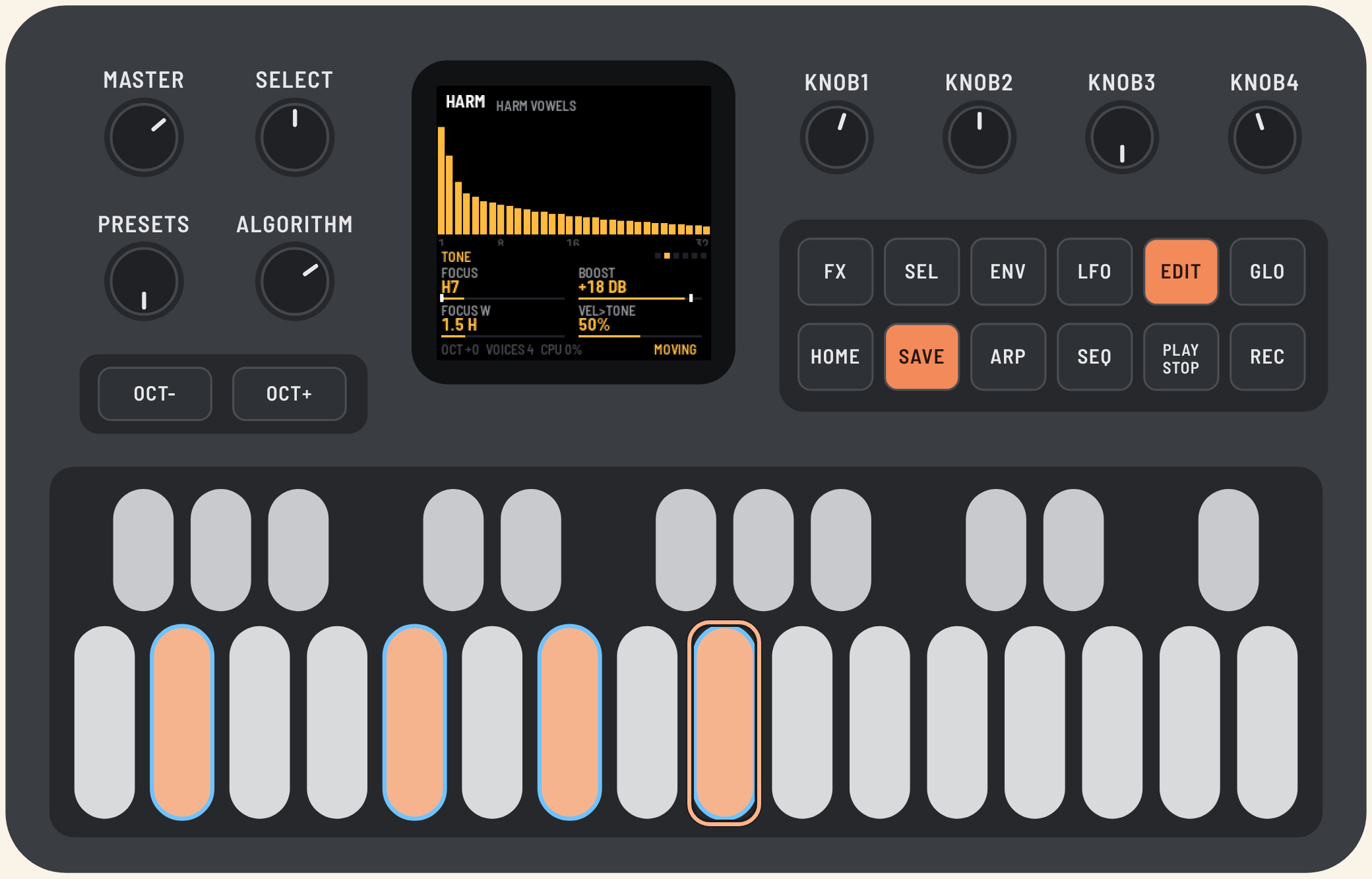
AEther: user manual
AEther is firmware for the M-VAVE FM-1 that turns any sound into a dense, endless cloud. It works like PaulStretch: it takes a long stretch of sound, keeps its colour (the spectrum) and replaces the phases with random ones. The sound loses its attacks and rhythm, and only the colour remains. The keys move that colour to the note's pitch, so you play chords with it.
All screenshots come from the browser emulator, which runs the same code as the device.
AI-generated code, no warranty. You use it at your own risk (the NOTICE file in the repository). Mind the volume: the sound can be loud and sharp. Version v0.5, in its first runs on a real FM-1. Polska wersja: instrukcja po polsku.
Installing
- Open the web installer in Chrome or Edge, connect the FM-1 by USB (directly to the computer) and press Install. Do not unplug the cable while it writes.
- When it is done, restart the FM-1: switch it off and on again. The FM-1 starts AEther by itself after the install, but without a full restart the sound can drop out; after one it plays cleanly.
To go back to M-VAVE's firmware, use the installer's "Back to the stock firmware", or M-VAVE's own updater, M-UPGRADE.
The panel
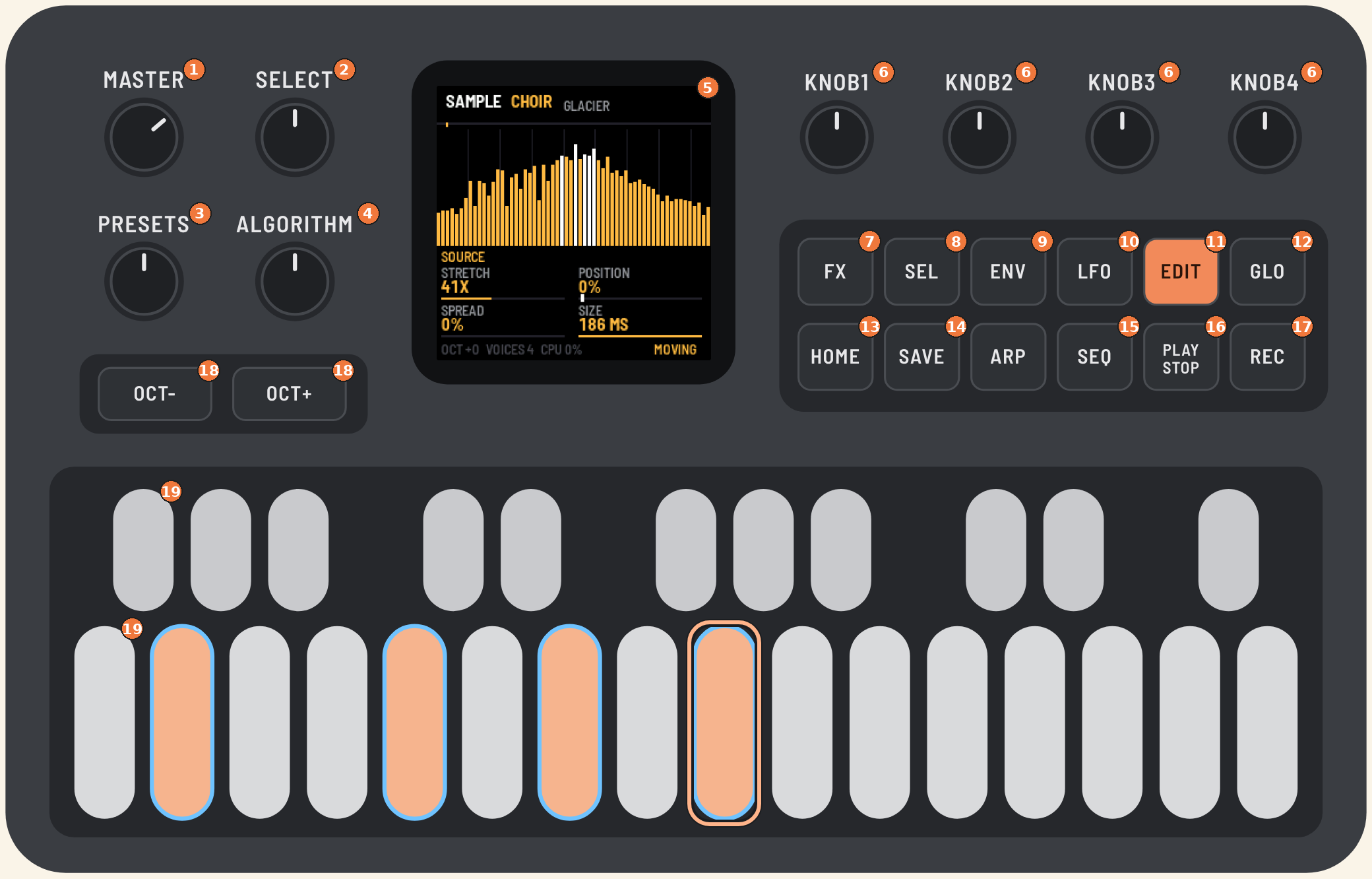
| No. | Control | What it does |
|---|---|---|
| 1 | MASTER | volume |
| 2 | SELECT | picks which sample or which LIVE generator (within the kind ALGORITHM picked) |
| 3 | PRESETS | picks a preset (31 factory presets) |
| 4 | ALGORITHM | picks the kind of source: SAMPLE, LIVE, PAD, HARM, VA |
| 5 | screen | source and preset, a view (spectrum, harmonics, LFO, matrix), the current page's four parameters |
| 6 | KNOB 1–4 | the current page's four parameters, in screen order: top left, top right, bottom left, bottom right |
| 7 | FX | colour: COLOR → EQ 1 → EQ 2 → EQ 3 (a parametric EQ) |
| 8 | SEL | the next page (every page in turn) |
| 9 | ENV | the envelopes: AMP → MOD ENV 1 → MOD ENV 2; held + a knob: modulate with an envelope |
| 10 | LFO | LFO 1 → LFO 2 → LFO 3 → MATRIX; held + a knob: modulate with an LFO |
| 11 | EDIT | the source: SOURCE, and with HARM also TONE and HARM ENV A–D |
| 12 | GLO | SETUP: global settings (the second core, the overload guard) |
| 13 | HOME | back to the main page (SOURCE); on it, silences all notes and turns HOLD off; held, shows the button map |
| 14 | SAVE | stores the settings; the button lights when something is unsaved |
| 15 | SEQ | EVOLVE: how the sound changes over time (depth and speed of the motion, drift, motion variants) |
| 16 | PLAY | HOLD: notes keep sounding after you let go of the keys, and a new chord replaces the old one |
| 17 | REC | FREEZE: freezes the sample's or VA's spectrum at the current moment (no effect with PAD and HARM) |
| 18 | OCT− / OCT+ | keyboard octave, ±2 |
| 19 | keys | 27 keys with velocity and pressure, from F3 (at octave 0) |
ARP is not used yet, so it stays dark.
Getting around
The pages are grouped under five buttons. Each button has its own pages:
| Button | Pages | What is there |
|---|---|---|
| EDIT | SOURCE (+ TONE, HARM ENV A–D with HARM) | the source's sound |
| ENV | AMP → MOD ENV 1 → MOD ENV 2 | the envelopes: volume and two for modulation |
| LFO | LFO 1 → LFO 2 → LFO 3 → MATRIX | the LFOs and the matrix that routes them |
| SEQ | EVOLVE | how the sound changes over time |
| FX | COLOR → EQ 1 → EQ 2 → EQ 3 | colour: TILT, SUB, SHIMMER, SIZE, then the EQ's three bands |
| GLO | SETUP | global settings |
There are three rules:
- Another group's button brings back the page you were last on in that group. If you were editing LFO 2, went to AMP and pressed LFO, you are back on LFO 2.
- The same button again goes to the group's next page (after the last one, back to the first). The dots next to the page name show how many pages the group has and which one you are on.
- HOME always goes back to the main page (SOURCE). Pressed on the main page, it silences all notes.
SEL steps through every page in turn, group by group.
The button map. Hold HOME and the screen shows what each button does right now. The outlined button is the group you are in. Let go of HOME to return.
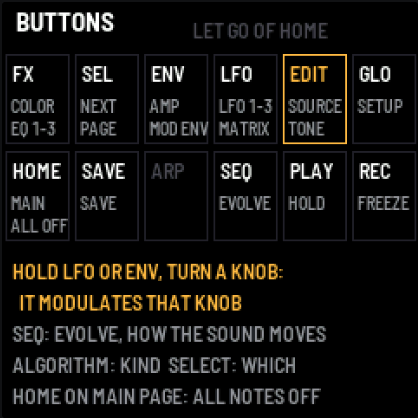
Button lights. The button of the group you are in is lit brightly, as are PLAY while HOLD is on, REC while FREEZE is on, and SAVE while there are unsaved changes. Buttons that do something glow dimly; the unused ARP is dark.
Quick modulation. Hold LFO (or ENV) and turn a knob on any page. The LFO (or MOD ENV) you looked at last starts moving the parameter under that knob, by as much as you turn. Details in the modulation section.
Presets and your changes. When you change something after choosing a preset, an asterisk (*) appears next to its name in the header. The first turn of PRESETS then only warns ("NOT SAVED"); the next one loads another preset. So your changes are not lost to an accidental nudge. SAVE keeps them.
The screen
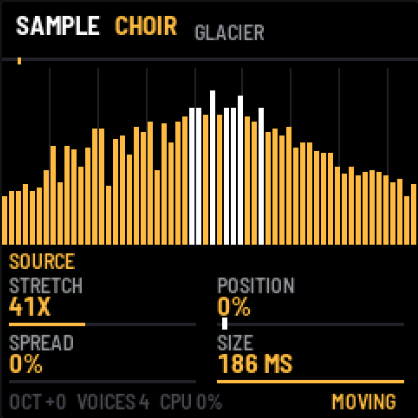
- Top: the kind of source (white), the sample or generator picked (orange) and the preset (grey), with an asterisk once you have changed something. On the right HOLD and FREEZE when they are on, and LOAD while the overload guard is working. After each knob move its name and value show here for a moment.
- Middle: depends on the page. Usually the spectrum of the last frame, from 40 Hz to 16 kHz, with a line at every octave. With a sample there is a scan bar above the spectrum: the grey mark shows POSITION, the bright one the place playing now. With HARM you see the harmonics, on the LFO and MOD ENV pages their shape, and on the MATRIX page the list of all eight slots.
- Page name with dots on the right: one dot for each page the current source has; the bright one is where you are.
- Four parameters with a value and a bar. A white mark on the bar means the parameter is modulated and shows where it is right now. The knob itself keeps its value.
- Footer: octave, number of sounding voices (up to 8), processor load, and on the right MOVING or STATIC: whether anything moves the sound over time.
Sources (ALGORITHM and SELECT)
The sources come in five kinds. ALGORITHM picks the kind, SELECT the sample or generator within it. A kind remembers what you last picked in it: back in SAMPLE, the same sample plays. With PAD, HARM and VA, SELECT changes nothing: each is one of its kind.
| ALGORITHM | SELECT picks | What it is |
|---|---|---|
| SAMPLE | CHOIR … TAPE, USER | recordings: 16 built-in samples and one loaded from a computer (USER appears only after loading) |
| LIVE | VOX, AIR, BOW, BELL | generators playing live: voices, wind, bowed strings, bells; no sample memory, changing slowly by themselves |
| PAD | – | ready-made harmonic clouds (PADsynth): every harmonic is a blurred band |
| HARM | – | a harmonic generator: count, slope, emphasis, 4 envelopes on chosen harmonics |
| VA | – | a virtual-analog oscillator with a filter, smeared live |
The header shows the kind (white), the sample or generator picked (orange) and the preset (grey), e.g. "SAMPLE CHOIR GLACIER".
The samples: choir, glass, strings, wind, piano, cello, flute, organ, kalimba, brass, tanpura, rain, birds, whisper, gamelan, tape piano.
With samples, C4 plays the original pitch and other keys shift the whole spectrum.
Pages and knobs
Each page is four parameters under KNOB 1–4. The SOURCE page depends on the source. TONE and HARM ENV A–D are there only with HARM.
SOURCE: sample (CHOIR … TAPE, USER)
| Knob | Parameter | Range | What it does |
|---|---|---|---|
| 1 | STRETCH | 1x … 8000x, INF | how many times slower the sample is scanned; INF stops the scan in place |
| 2 | POSITION | 0–100 % | where the scan starts (and returns to after the end); with STRETCH INF it "scrubs" |
| 3 | SPREAD | 0–100 % | spectral blur: tones spill into bands of noise |
| 4 | SIZE | 23, 46, 93, 186 ms | window length: short is grainy and reacts faster, long is smooth |
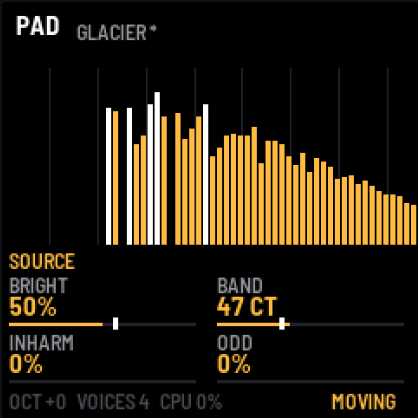
SOURCE: PAD
| Knob | Parameter | Range | What it does |
|---|---|---|---|
| 1 | BRIGHT | 0–100 % | brightness: how slowly the higher harmonics fade |
| 2 | BAND | 1–300 cents | width of each harmonic: narrow is an organ, wide is a choir |
| 3 | INHARM | 0–100 % | stretches the harmonics upwards, like a bell or a stiff string |
| 4 | ODD | 0–100 % | removes the even harmonics (a hollow, clarinet-like sound) |
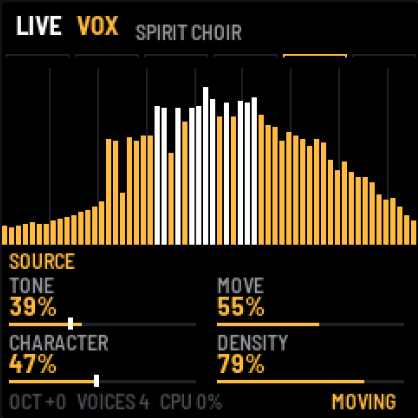
SOURCE: LIVE VOX, LIVE AIR, LIVE BOW, LIVE BELL
These are not recordings but small programs that play C4 all the time and feed the engine, the way VA does. The idea comes from the demoscene's 64k intros: keep the recipe, not the data. Each takes a few hundred bytes of code, has no length and no loop, and changes slowly by itself.
| Source | What it plays |
|---|---|
| LIVE VOX | a few slightly detuned voices through four formants that move slowly from vowel to vowel |
| LIVE AIR | wind: noise through resonances on the note's harmonics, each gusting on its own |
| LIVE BOW | bowed strings: plucked-string loops (Karplus-Strong) kept sounding by a noisy "bow" whose pressure wanders |
| LIVE BELL | a field of bells: modal resonators struck at random moments |
They share the same four knobs, which mean slightly different things for each:
| Knob | Parameter | VOX | AIR | BOW | BELL |
|---|---|---|---|---|---|
| 1 | TONE | breath and brightness | the resonances' register | the strings' damping (dark ↔ bright) | how long the upper modes ring |
| 2 | MOVE | how fast the vowels change | gusts | the bow pressure's changes | how much the strikes vary |
| 3 | CHARACTER | low ↔ high voices | breathy ↔ whistling | smooth ↔ scratchy | harmonic ↔ bell-like |
| 4 | DENSITY | 1–6 voices | 1–8 resonances | 1–4 strings | strikes per second |
MOVE = 0 stops the source's own motion. The matrix has the destinations LIVE TONE, LIVE MOVE, LIVE CHAR and LIVE DENSITY, and with these sources DRIFT moves TONE, CHARACTER and TILT. Cost: a few percent of the processor (an estimate from a measurement on a computer).
SOURCE: VA
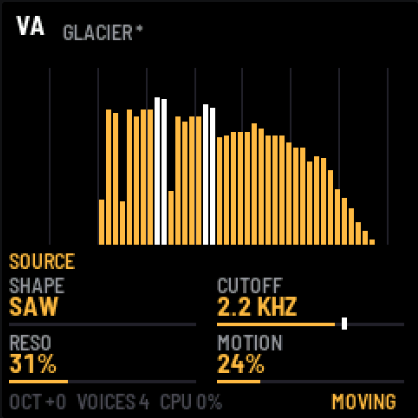
| Knob | Parameter | Range | What it does |
|---|---|---|---|
| 1 | SHAPE | SAW → SQUARE → PULSE | waveform: saw, square, ever narrower pulse |
| 2 | CUTOFF | 60 Hz – 18 kHz | filter cutoff (24 dB/oct), the same for every key |
| 3 | RESO | 0–100 % | filter resonance: a clear peak at the cutoff |
| 4 | MOTION | 0–100 % | a slow, drifting LFO on the cutoff, the cloud "breathes" |
SOURCE and TONE: HARM
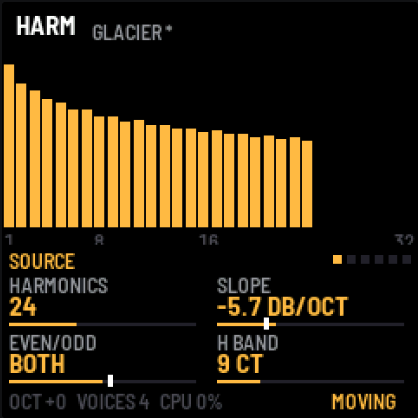
HARM builds the sound from harmonics; the screen shows their levels as bars H1–H32 (a 48 dB scale).
| Knob | Parameter | Range | What it does |
|---|---|---|---|
| 1 | HARMONICS | 1–64 | how many harmonics |
| 2 | SLOPE | 0 … −18 dB/oct | how quickly the higher ones fade: 0 is all equal (bright), −18 almost only the fundamental |
| 3 | EVEN/ODD | EVEN 100 % … BOTH … ODD 100 % | towards ODD it silences the even harmonics, towards EVEN the odd ones (the fundamental stays) |
| 4 | H BAND | 1–150 cents | width of each harmonic: narrow is a pure tone, wide is a choir |
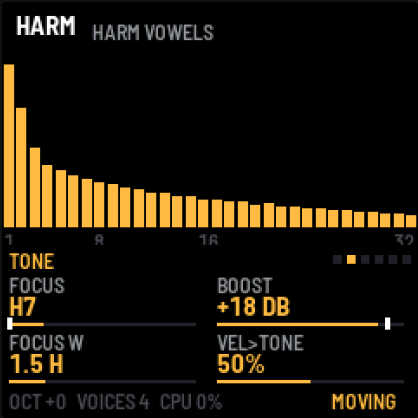
A second press of EDIT opens TONE, and further presses the harmonic envelopes HARM ENV A–D. TONE is emphasis or a notch around a chosen harmonic, and the response to velocity.
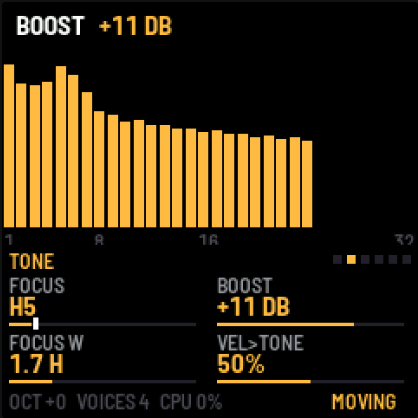
| Knob | Parameter | Range | What it does |
|---|---|---|---|
| 1 | FOCUS | H1–H32 | the harmonic BOOST works around |
| 2 | BOOST | −24 … +24 dB | emphasis (+) or a notch (−) around FOCUS, like a formant |
| 3 | FOCUS W | 0.4–6 harmonics | width of the emphasis: narrow is one harmonic, wide is a group |
| 4 | VEL>TONE | 0–100 % | a softer hit gives a darker colour, by as much as you set |
HARM ENV A–D: harmonic envelopes (EDIT, with HARM)
Four envelopes, each controlling chosen harmonics. They run from the start of each note: they rise over ATTACK to full level, fall over DECAY to the SUSTAIN level and stay there. Harmonics no envelope touches play all the time. When several envelopes hit the same harmonic, their effects multiply.
On an envelope's page the harmonics it controls light up white, and its shape shows in the top right corner. Harmonics of other envelopes are dimmed orange.
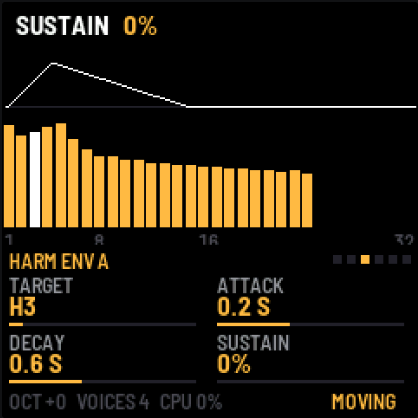 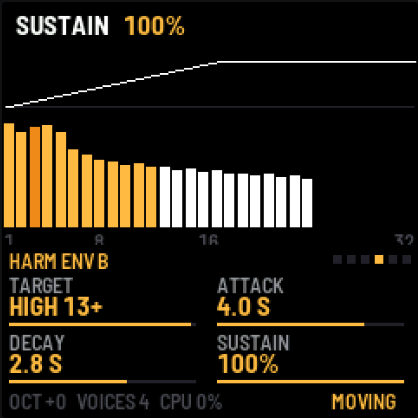
| Knob | Parameter | Range | What it does |
|---|---|---|---|
| 1 | TARGET | OFF, H1–H32, ODD, EVEN, LOW 1-4, MID 5-12, HIGH 13+, ALL | which harmonics it controls |
| 2 | ATTACK | 10 ms – 20 s | rise time |
| 3 | DECAY | 50 ms – 30 s | fall time to SUSTAIN |
| 4 | SUSTAIN | 0–100 % | the level it stays at |
Examples:
- ENV A = H3, ATTACK 0.2 s, DECAY 0.6 s, SUSTAIN 0 % (left screenshot): the third harmonic flashes at the start of the note and disappears.
- ENV B = HIGH 13+, ATTACK 4 s, SUSTAIN 100 % (right screenshot): the high harmonics come in slowly and the colour opens up.
- TARGET = H1, SUSTAIN 30 %: the fundamental fades after the attack, leaving the "air".
How the whole note fades after you let go is set separately: RELEASE on the AMP page.
AMP (ENV)
The first page under ENV: the whole note's volume envelope, and the output.
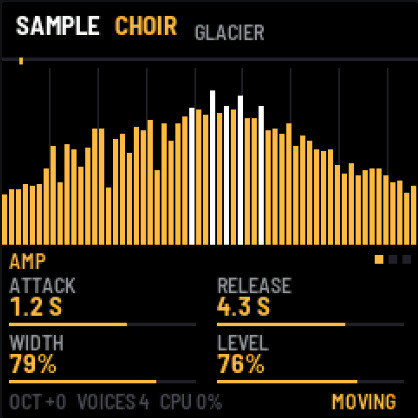
| Knob | Parameter | Range | What it does |
|---|---|---|---|
| 1 | ATTACK | 10 ms – 20 s | the note's rise |
| 2 | RELEASE | 50 ms – 30 s | the fade after letting go of the key |
| 3 | WIDTH | 0–100 % | stereo width: 0 is mono, 100 two independent channels |
| 4 | LEVEL | 0–100 % | engine volume (headroom before the soft limiter) |
Modulation: LFO 1–3, MOD ENV 1–2 and MATRIX
Modulation has two parts. The modulators (three LFOs and two envelopes) only move; on their own they change nothing. The matrix (MATRIX, the last page under LFO) has eight slots, and each connects one source to one parameter with a chosen amount. One LFO can therefore move several parameters at once, each by a different amount and in a different direction. One parameter can also listen to several sources, and their effects add up.
Modulation adds to the knob's setting: the knob sets the centre and the modulation moves around it. AMOUNT ±100 % means a move over the parameter's whole range, and a negative AMOUNT reverses the direction.
#### Quick: hold LFO or ENV and turn a knob
You do not have to open the matrix. On any page, hold LFO and turn the knob of the parameter that should move. The header shows what you made, e.g. "LFO 1 > CUTOFF +19%". Turning right gives a positive amount, left a negative one, and back to 0 % frees the slot. ENV held works the same way, with a MOD ENV. It uses the LFO (or MOD ENV) you looked at last, LFO 1 and MOD ENV 1 at first. Everything lands in the matrix, where you can refine it later.
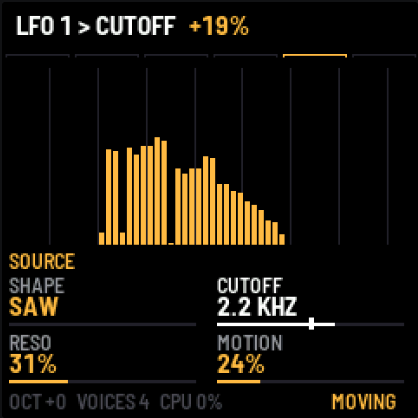
If a parameter cannot be modulated (e.g. SIZE or MOTION), the header says "NO MODULATION". When all 8 slots are taken, it says "MATRIX FULL".
#### LFO 1, LFO 2, LFO 3 (LFO)
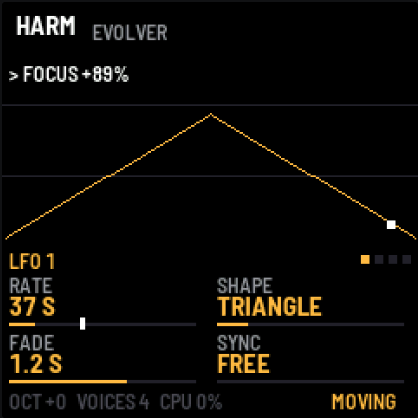
| Knob | Parameter | Range | What it does |
|---|---|---|---|
| 1 | RATE | 0.01–10 Hz | speed; below 1 Hz the screen shows the period in seconds (e.g. 37 S) |
| 2 | SHAPE | SINE, TRIANGLE, SAW UP, SAW DOWN, SQUARE, RANDOM, DRIFT | shape; RANDOM jumps every cycle, DRIFT glides to random points |
| 3 | FADE | OFF, 10 ms – 20 s | after every new note the LFO rises from zero over this time |
| 4 | SYNC | FREE, KEY | KEY: every new note starts the LFO from the start of its cycle |
The screen shows the waveform with a dot at the current place, and above it the LFO's destinations from the matrix.
#### MOD ENV 1 and MOD ENV 2 (ENV, after AMP)
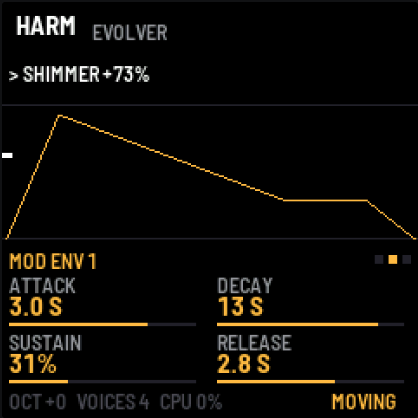
| Knob | Parameter | Range | What it does |
|---|---|---|---|
| 1 | ATTACK | 10 ms – 20 s | rise from zero to full |
| 2 | DECAY | 50 ms – 30 s | fall to SUSTAIN |
| 3 | SUSTAIN | 0–100 % | the level it stays at while you hold a key (or HOLD is on) |
| 4 | RELEASE | 50 ms – 30 s | back to zero after all keys are released |
The envelope starts again with every new note (from the keys and from MIDI). It is shared by all voices: it moves a parameter of the whole sound, not of a single note. The screen shows its shape with a line at the current level.
#### MATRIX (LFO, after LFO 3)
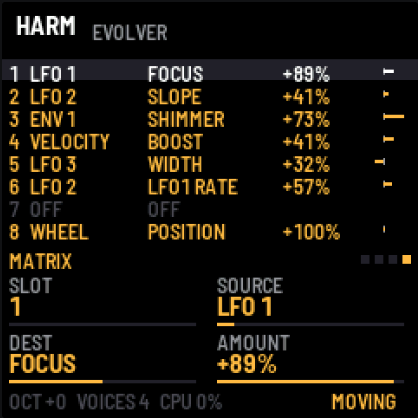
| Knob | Parameter | What it does |
|---|---|---|
| 1 | SLOT | which of the eight slots you are editing (highlighted in the list) |
| 2 | SOURCE | the modulation source |
| 3 | DEST | the destination |
| 4 | AMOUNT | amount and direction, −100 … +100 % |
The list above the knobs shows all eight slots: source, destination, amount and a bar with the current contribution.
Sources (SOURCE):
| Source | Value | From |
|---|---|---|
| LFO 1–3 | −1 … +1 | the LFO pages |
| ENV 1–2 | 0 … 1 | the MOD ENV pages |
| VELOCITY | 0 … 1 | how hard the last note was played |
| WHEEL | 0 … 1 | the mod wheel, MIDI CC1 |
| PRESSURE | 0 … 1 | key pressure (FM-1), MIDI aftertouch (channel and polyphonic) |
| RANDOM | −1 … +1 | a new random value with every note |
| KEY | −1 … +1 | the last note's pitch: C4 is 0, two octaves down or up are −1/+1 |
Destinations (DEST): STRETCH, POSITION, SPREAD, TILT, SUB, SHIMMER, WIDTH, LEVEL, BRIGHT, BAND, INHARM, ODD, SHAPE, CUTOFF, RESO, SLOPE, EVEN/ODD, FOCUS, BOOST, H BAND, plus LFO1 RATE, LFO2 RATE, LFO3 RATE: the speed of another LFO (one LFO can speed up and slow down another). A destination only works when it applies to the current source: CUTOFF moves the VA filter, for example, and FOCUS works with HARM. Then LIVE TONE, LIVE MOVE, LIVE CHAR, LIVE DENSITY (the LIVE sources) and EQ1–EQ3 FREQ, GAIN, WIDTH, the EQ's bands: a slow LFO on EQ2 FREQ with the bell boosted, for example, sweeps a "vowel" through any source.
By default slot 8 is WHEEL → POSITION +100 %: the mod wheel scrubs the sample. Presets may change that.
On the page of a modulated parameter, a white mark on the bar shows its current value:
The engine takes new values once per frame, every 11–93 ms depending on SIZE. A very fast LFO at a large SIZE will therefore be steppy. This aesthetic likes rates below 1 Hz.
A few ideas:
- LFO 1 → POSITION (SINE, a few seconds) with STRETCH INF scrubs the sample back and forth.
- LFO 1 → FOCUS (TRIANGLE, slow) with BOOST +12 dB gives "vowels" wandering over the harmonics (the HARM VOWELS preset).
- LFO 3 → LFO1 RATE: the vowels speed up and slow down.
- DRIFT → POSITION makes the scan wander around the sample unpredictably (the DRIFT FOG preset).
- ENV 1 → SPREAD with a negative AMOUNT: every new note starts clean and then blurs.
- VELOCITY → BOOST and PRESSURE → SHIMMER: harder playing opens the colour, pressing down adds the octave above.
- RANDOM → POSITION: every note starts at a different place in the sample.
- KEY → TILT: higher notes are brighter.
EVOLVE (SEQ): motion over time
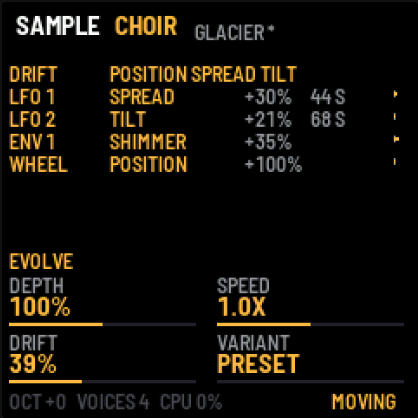
These textures only come alive when they change slowly: over a minute, not a second. The EVOLVE page gathers everything that moves the sound over time. Its four knobs act on all the motion at once.
| Knob | Parameter | Range | What it does |
|---|---|---|---|
| 1 | DEPTH | 0–200 % | how strongly the whole matrix acts: 0 % the sound stands still, 100 % as set, 200 % twice as much |
| 2 | SPEED | /4X … 4X | the rate of every LFO at once: /4X four times slower, 4X four times faster |
| 3 | DRIFT | 0–100 % | a built-in, very slow wander (a new target every 20–60 s) of the three parameters that colour the current source most |
| 4 | VARIANT | PRESET, #1 … #99 | ready-made motions: each number is a different set of slow LFOs, envelopes and matrix routes; PRESET brings back the preset's own |
What DRIFT moves depends on the source:
| Source | DRIFT moves |
|---|---|
| sample | POSITION, SPREAD, TILT |
| PAD | BRIGHT, BAND, TILT |
| VA | CUTOFF, SHAPE, TILT |
| HARM | FOCUS, SLOPE, EVEN/ODD |
Above the knobs is a list of what moves right now: DRIFT and its parameters, then every route of the matrix with its amount, its LFO's cycle (with SPEED applied) and a bar with what it adds now.
VARIANT is the quickest way to a moving sound: turn KNOB 4 and listen. The same number with the same source always gives the same motion, so a good one is easy to find again. A variant overwrites the LFOs, MOD ENV 1 and the matrix's slots 1–6 (slots 7 and 8 stay); VARIANT = PRESET brings the preset's motion back.
A hint. If you hold a sound in which nothing moves for 12 s (the footer says STATIC), the header suggests once: "STATIC SOUND? SEQ: EVOLVE".
Every factory preset moves: each has DRIFT, slow LFOs (cycles from ten-odd seconds to a minute and a half) and often an envelope that slowly opens the colour. They make a good starting point: look at EVOLVE and MATRIX to see how they are made.
COLOR (FX)
| Knob | Parameter | Range | What it does |
|---|---|---|---|
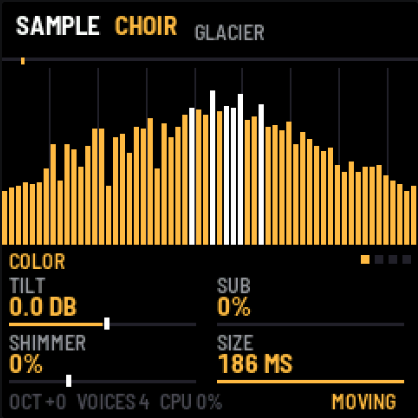
| 1 | TILT | −6 … +6 dB/oct | tilts the colour: darker or brighter, pivoting at 500 Hz |
| 2 | SUB | 0–100 % | adds the same spectrum an octave lower |
| 3 | SHIMMER | 0–100 % | adds the same spectrum an octave higher |
| 4 | SIZE | 23–186 ms | the same as SIZE on the sample page, available with every source |
EQ 1, EQ 2, EQ 3 (FX): a parametric EQ
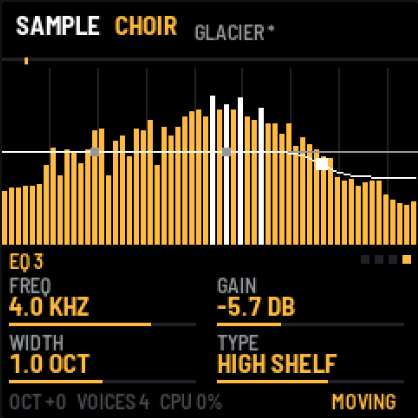
Three EQ bands act last, on the spectrum, together with TILT. An EQ page shows the whole EQ's curve (the white line, ±18 dB) over the spectrum and the bands' points, this page's band highlighted. The EQ is optional: by default its bands are at 0 dB and change nothing (a low shelf at 150 Hz, a bell at 1 kHz, a high shelf at 5 kHz).
| Knob | Parameter | Range | What it does |
|---|---|---|---|
| 1 | FREQ | 20 Hz – 20 kHz | the band's frequency (a cut's corner) |
| 2 | GAIN | −18 … +18 dB | boost or cut (shelves and the bell) |
| 3 | WIDTH | 0.25–4 octaves | the bell's width, the shelf's gentleness |
| 4 | TYPE | OFF, BELL, LOW SHELF, HIGH SHELF, LOW CUT, HIGH CUT | the band's shape; the cuts are 12 dB/oct and ignore GAIN |
Each band's FREQ, GAIN and WIDTH are matrix destinations (EQ1 FREQ … EQ3 WIDTH), so the EQ can move like any other parameter. A few presets (HARM BLOOM, BELL CLOUD, DAWN and others) use EQ 3 as a gentle high shelf to soften the top.
SETUP (GLO)
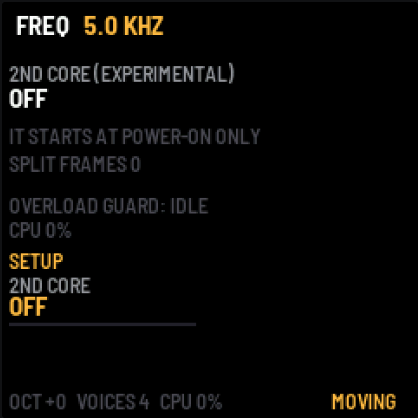
| Knob | Parameter | What it does |
|---|---|---|
| 1 | 2ND CORE | OFF / ON: the processor's second core, experimental |
The FM-1 has two cores, but its stock firmware uses only one. With 2ND CORE on, the second core paints the spectra of half the voices, which gives headroom with many notes and the HARM source. The core can only be started at power-on, so: set ON, press SAVE, switch the FM-1 off and on again.
The screen shows the state: OFF, RUNNING, DID NOT START (the core did not answer), GIVEN UP: ONE CORE (the core was late or misread a job, so one core plays until power-off) and BARRED UNTIL POWER-OFF (after such an error and a reset). In all these cases the sound carries on with one core. SPLIT FRAMES counts the frames shared between the cores. The second core does not run in the emulator.
This feature has not been tested on a real FM-1 yet. Other authors report that on some units the second core can be unstable under load. If something goes wrong, set OFF and save.
The overload guard is always on, with or without the second core. When the processor cannot keep up, AEther first turns off SUB and SHIMMER, then reduces the number of voices (down to two). After three quiet seconds it steps back, one step at a time. You see its state on the SETUP page (OVERLOAD GUARD) and in the header (LOAD).
Presets
| No. | Preset | Source | Character |
|---|---|---|---|
| 1 | GLACIER | CHOIR | choir stretched ~40x, the starting point |
| 2 | FOG | CHOIR | slower, blurred, darker, with the octave below |
| 3 | HALO | PAD | bright pad with the octave above |
| 4 | ORGAN DUST | PAD | narrow bands, no even harmonics: an organ |
| 5 | BELL CLOUD | PAD | inharmonic, bell-like |
| 6 | ANALOG MIST | VA | saw, warm filter, MOTION |
| 7 | RESO SWEEP | VA | square, resonance, clear filter movement |
| 8 | HARM BLOOM | HARM | the high harmonics come in slowly; LFO 1 → TILT, ENV 2 → SLOPE |
| 9 | HARM BELL | HARM | a flash of high harmonics and H3 at the attack, H5 emphasised |
| 10 | HARM VOWELS | HARM | LFO 1 → FOCUS, LFO 2 → BOOST, LFO 3 → LFO 1's rate: wandering vowels |
| 11 | HARM HOLLOW | HARM | odd harmonics only (clarinet-like), the high ones come in slowly through ENV A |
| 12 | DRIFT FOG | CHOIR | DRIFT wanders the scan around the sample (POSITION), a second LFO sways the colour (TILT) |
| 13 | EVOLVER | HARM | six matrix slots: vowels, a breathing slope, SHIMMER from an envelope, velocity on BOOST, a swaying width |
| 14 | BREATHING GLASS | GLASS | every note starts clean and blurs (ENV 2), pressure adds the octave above, RANDOM moves the start |
| 15 | GLASS RAIN | GLASS | glass, with the octave above |
| 16 | HARP DREAM | STRING | strings, wide |
| 17 | WIND TUNNEL | WIND | wind, blurred, very wide |
| 18 | FELT DREAM | PIANO | dark piano |
| 19 | CELLO SEA | BOWED | cello, long rise |
| 20 | TANPURA | DRONE | a buzzing drone, darkened |
| 21 | RAIN ROOM | RAIN | rain in a room |
| 22 | DAWN | BIRDS | birds blurred into dawn |
| 23 | TAPE MEMORY | TAPE | a piano from tape |
| 24 | GRAIN | CHOIR | the shortest window, grainy, fast |
| 25 | FROZEN | CHOIR | STRETCH INF, heavily blurred, a frozen moment |
| 26 | DEEP | PAD | dark, with a strong octave below |
| 27 | SPIRIT CHOIR | LIVE VOX | six voices wandering between vowels, the colour opening slowly |
| 28 | NORTH WIND | LIVE AIR | a whistling wind, its register and number of resonances swaying |
| 29 | BOWED DRONE | LIVE BOW | four strings, the bow now smooth, now scratchy |
| 30 | BELL FIELD | LIVE BELL | bells struck ever more and less often |
| 31 | CRYSTAL VOICES | LIVE VOX | high voices with the octave above, fast-changing vowels |
Choosing a preset changes the source, every knob, the modulators and the matrix. SAVE stores the current state, including knob changes, but there is only one save slot. With unsaved changes (the asterisk next to the name), the first turn of PRESETS only warns, and the next one changes the preset.
To keep more sounds, store them as user presets (up to 16) from the browser editor: they show in the PRESETS list after the factory ones, under their own names.
Playing
- HOLD (PLAY): play a chord, let go, and it stays. The next chord replaces it. Pressing PLAY again turns HOLD off and releases the notes.
- FREEZE (REC): holds the sample's or VA's spectrum at the current moment. Notes, envelopes and AMP carry on, and the scan moves on from where it was once FREEZE is off. With PAD and HARM the spectrum comes from the knobs anyway, so FREEZE changes nothing.
- Latency: a note starts sounding in the next frame, after ~100–140 ms at SIZE 186 ms and ~20 ms at 23 ms. That is part of the character, not a bug.
- Polyphony: 8 voices. A ninth note takes the quietest voice. When the processor cannot keep up, the overload guard reduces the number of voices for a while (see SETUP).
MIDI
Over USB and the TRS jack:
| Message | Effect |
|---|---|
| notes, any channel | play (with velocity) |
| CC64 | sustain |
| CC1 (mod wheel) | the matrix's WHEEL source (by default scrubs POSITION) |
| aftertouch (channel, polyphonic) | the matrix's PRESSURE source |
| CC71 | SPREAD |
| CC74 | TILT |
| CC120, CC123 | all off |
Notes from the FM-1's keys go out over USB.
The editor in the browser
The project's site has an editor (editor/) that talks to the FM-1 over USB (Chrome, Edge or Opera on a computer; the browser asks for MIDI access with SysEx):
- Connect the FM-1 running AEther with a USB cable, open the editor, pick the FM-1's port and click Connect.
- Every page (EDIT, ENV, LFO, SEQ, FX, GLO) is visible at once. A change on the page plays on the FM-1 at once, and a knob turned on the FM-1 shows on the page.
- Pink marks on the sliders show where modulation (LFOs, envelopes, EVOLVE) moves a parameter right now. The chart on top is the spectrum of what plays, with the EQ curve (as set and as modulated). The matrix shows each slot's source value as it is now.
- Store as user preset: give it a name (up to 12 characters), pick one of 16 places and store. The preset goes into the FM-1's flash and shows in the PRESETS list (after the 31 factory ones). Save settings does what SAVE does on the FM-1.
Debug (at the bottom of the editor): while it is open the FM-1 reports, once a second, how long each audio render takes (the engine, the source, the modulation), which stages of the engine take the time, and a log of the renders that went wrong (over 80 % of their time, a late frame, an xrun), each with what was running. If the sound glitches, open it, play until it happens, press Copy report and send the text with the bug report.
Double-click a slider to get its default back. With no FM-1 connected the editor is a preview and sends nothing.
Your own sample
pip install numpy mido python-rtmidi
python3 tools/aether_load.py my.wav                 # up to 23 s, 22 kHz + high-band rebuild (SBR)
python3 tools/aether_load.py my.wav --rate 11025    # up to 47 s
python3 tools/aether_load.py my.wav --pcm16         # no compression noise, up to 6 s
After loading, the source switches to USER and the sample stays in memory after power-off. Loading does not work in the emulator.
The emulator in the browser
The same firmware runs in the browser: build it with ./build.sh --web or download the aether-emulator artifact from CI. Click Switch on. Turn knobs by dragging up/down, with the wheel or the arrow keys. To hold a chord with the mouse, Shift-click the keys (the key stays down).
| Computer key | FM-1 |
|---|---|
Q–I, A–K | white keys |
1–0, - | black keys |
Z / X | OCT− / OCT+ |
P | PLAY (HOLD) |
O | REC (FREEZE) |
Esc | HOME |
↑ / ↓ on the panel | SELECT (which sample or generator) |